MomentShot
Production planning app for filmmakers and creators.
映像制作者とクリエイターのための制作計画アプリ。
The Story
ストーリー
MomentShot came from a simple frustration: I was spending too much time organizing shoots outside the actual creative work. When planning videos for YouTube, short films, and client projects, I needed a place to turn scripts into scenes, break scenes into shots, attach visual references, organize shooting days, and export a clean shot list. Existing tools often felt either too expensive, too complicated, or not built for the way small creator teams actually work. So I started building my own tool. MomentShot was designed around one goal: help creators arrive on set with a clear plan, so they can focus more on capturing the moment and less on managing scattered notes.
MomentShotは、シンプルな不満から生まれました。撮影そのものではなく、その前の整理作業に時間がかかりすぎていたからです。YouTube動画、短編映画、クライアント案件を企画する中で、脚本をシーンに分け、シーンをショットに分解し、参考画像を添付し、撮影日を整理し、見やすいショットリストとして出力できる場所が必要でした。既存のツールは、高すぎる、複雑すぎる、または小規模なクリエイターチームの実際の動きに合っていないと感じることが多くありました。そこで、自分でツールを作り始めました。MomentShotは、クリエイターが明確な計画を持って現場に入り、散らばったメモの管理ではなく、瞬間を撮ることに集中できるようにすることを目指して設計しました。
Product Approach
プロダクトアプローチ
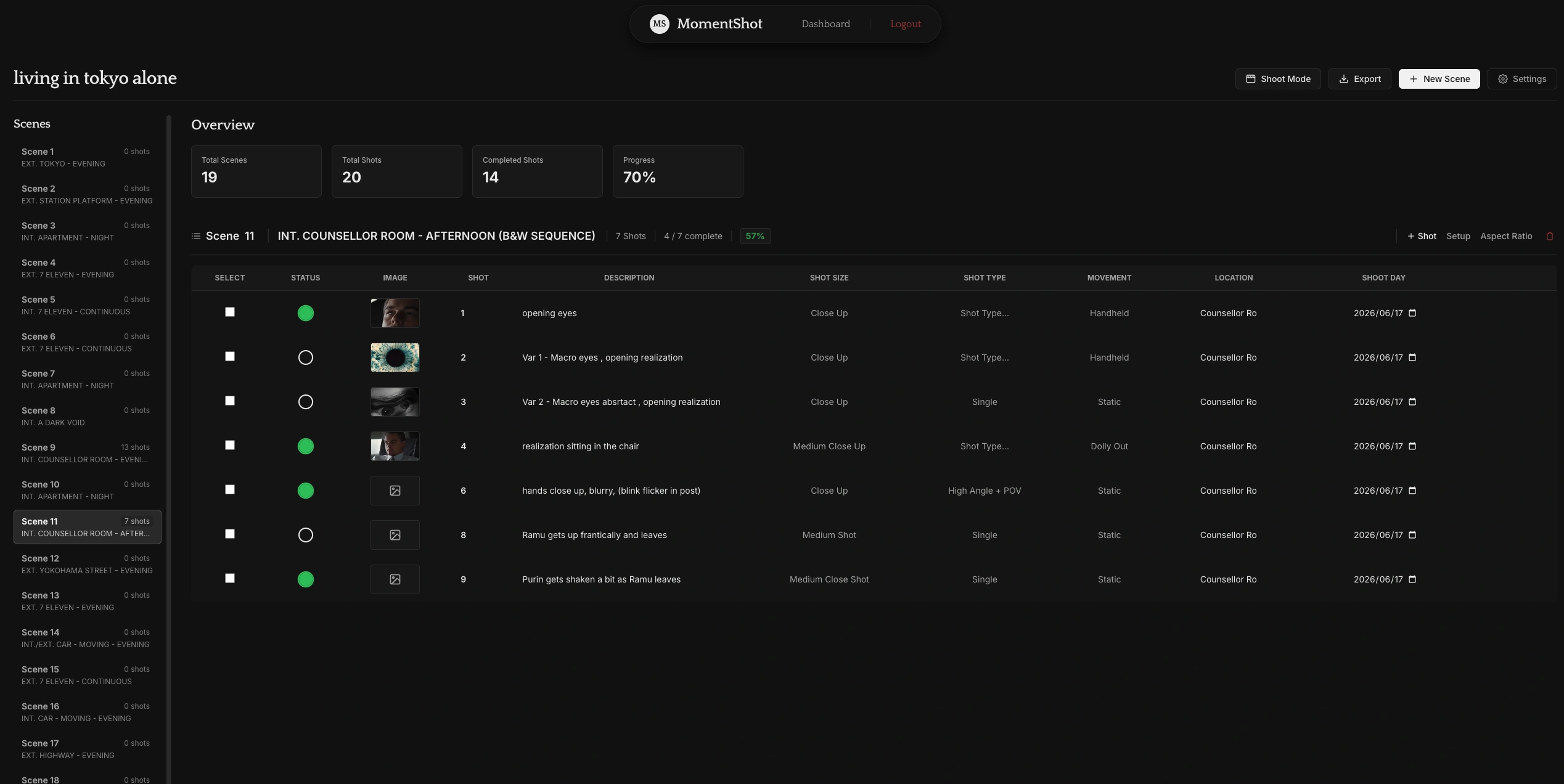
The app is built around the real flow of production planning. A user can create a project, import or organize scenes, add shots, attach reference images, assign shooting days and locations, and generate a clean shot list for the shoot. I focused on making the tool practical rather than overloaded. The interface needed to be fast, visual, and easy to update, because plans often change during filming. Instead of treating production planning as a static document, MomentShot treats it as a living workflow that supports both preparation and execution on set.
このアプリは、実際の制作計画の流れに合わせて作りました。ユーザーはプロジェクトを作成し、シーンを読み込みまたは整理し、ショットを追加し、参考画像を添付し、撮影日やロケーションを割り当て、撮影用のショットリストを出力できます。機能を詰め込みすぎるのではなく、実用性を重視しました。撮影中は予定が変わることが多いため、インターフェースは速く、視覚的で、更新しやすい必要がありました。MomentShotでは、制作計画を固定されたドキュメントではなく、準備と現場での実行を支える生きたワークフローとして捉えています。
Features
主な機能
Visual Shot Lists
ビジュアルショットリスト
Shots can be organized with details such as shot size, movement, description, location, reference images, and shooting day. This helps the creative plan stay visible and structured.
ショットサイズ、カメラの動き、説明、ロケーション、参考画像、撮影日などの情報を整理できます。クリエイティブな計画を視覚的かつ構造的に管理できます。
Script to Scene Workflow
脚本からシーンへのワークフロー
Scripts can be imported and broken into scenes, making it easier to move from written ideas to an actual production plan.
脚本を読み込み、シーンごとに分けることで、文章としてのアイデアを実際の制作計画へ落とし込みやすくします。
Reference Images
参考画像
Each shot can include visual references, helping the team understand framing, mood, and composition before filming begins.
各ショットに参考画像を追加できるため、撮影前にフレーミング、雰囲気、構図をチームで共有しやすくなります。
Shoot Mode
Shoot Mode
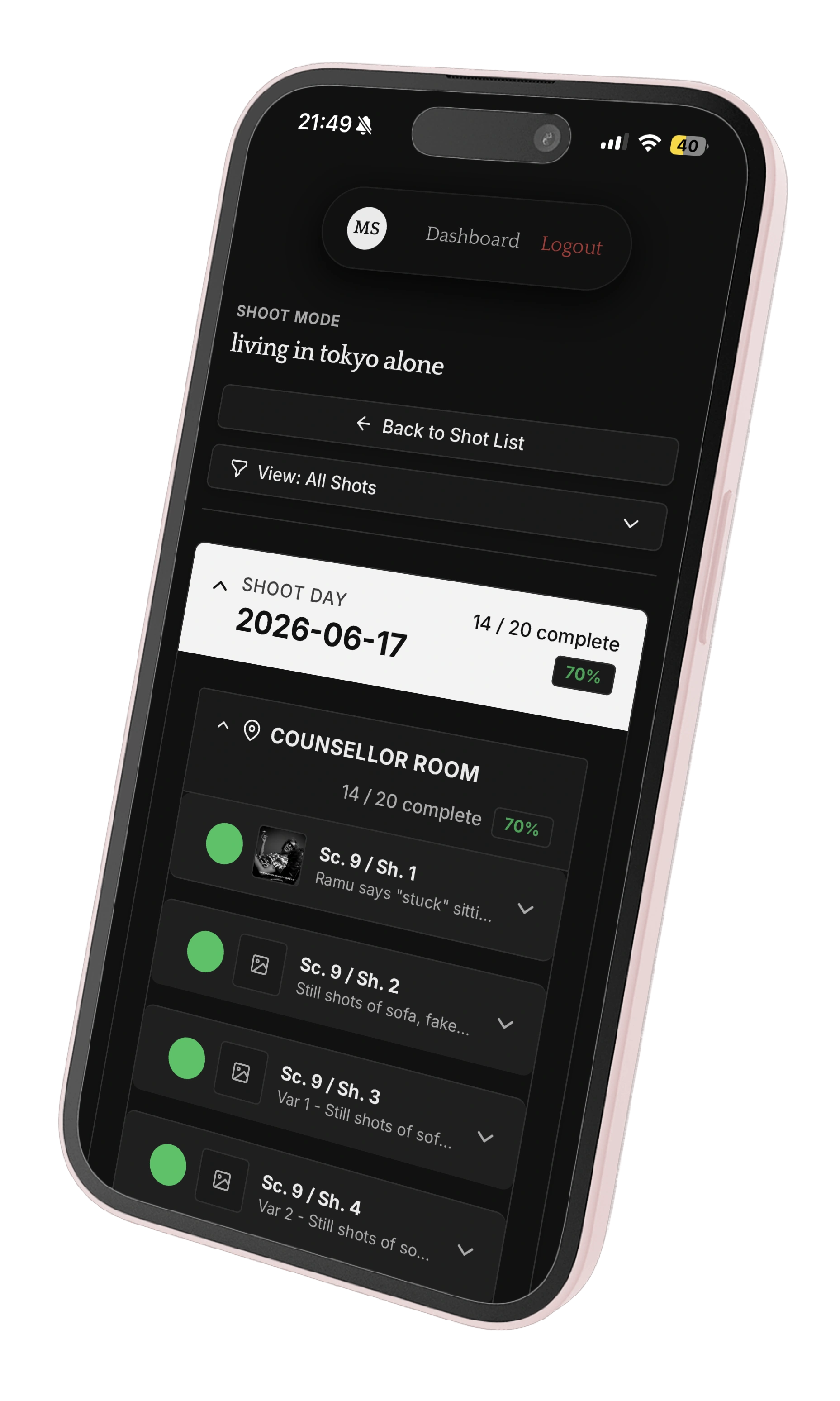
During production, users can switch to Shoot Mode, a streamlined on-set view that organizes shots by location or shooting day. Key details and references remain accessible, while completed shots can be marked off to track progress and keep production moving smoothly.
撮影中はShoot Modeに切り替えることで、ロケーションや撮影日ごとにショットを整理した現場用ビューを使えます。重要な情報や参考画像をすぐ確認でき、完了したショットにはチェックを入れることで進捗を把握しながら撮影を進められます。
Custom PDF Export
カスタムPDF出力
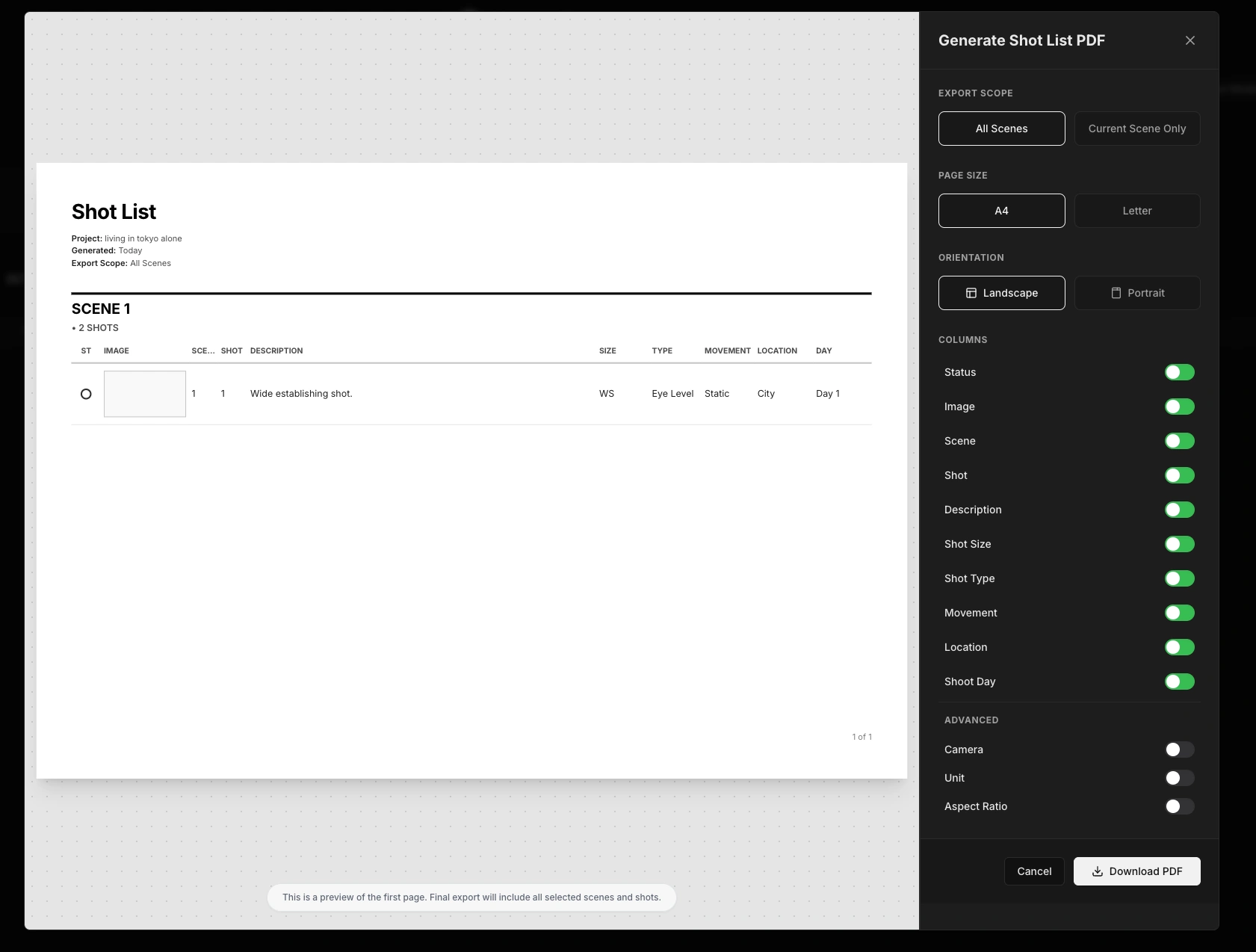
Shot lists can be exported as clean PDFs, making it easier to share the plan or bring it to set.
ショットリストを見やすいPDFとして出力できます。共有用や撮影現場への持ち込み用として使いやすくなります。
Mobile-Friendly Interface
モバイル対応インターフェース
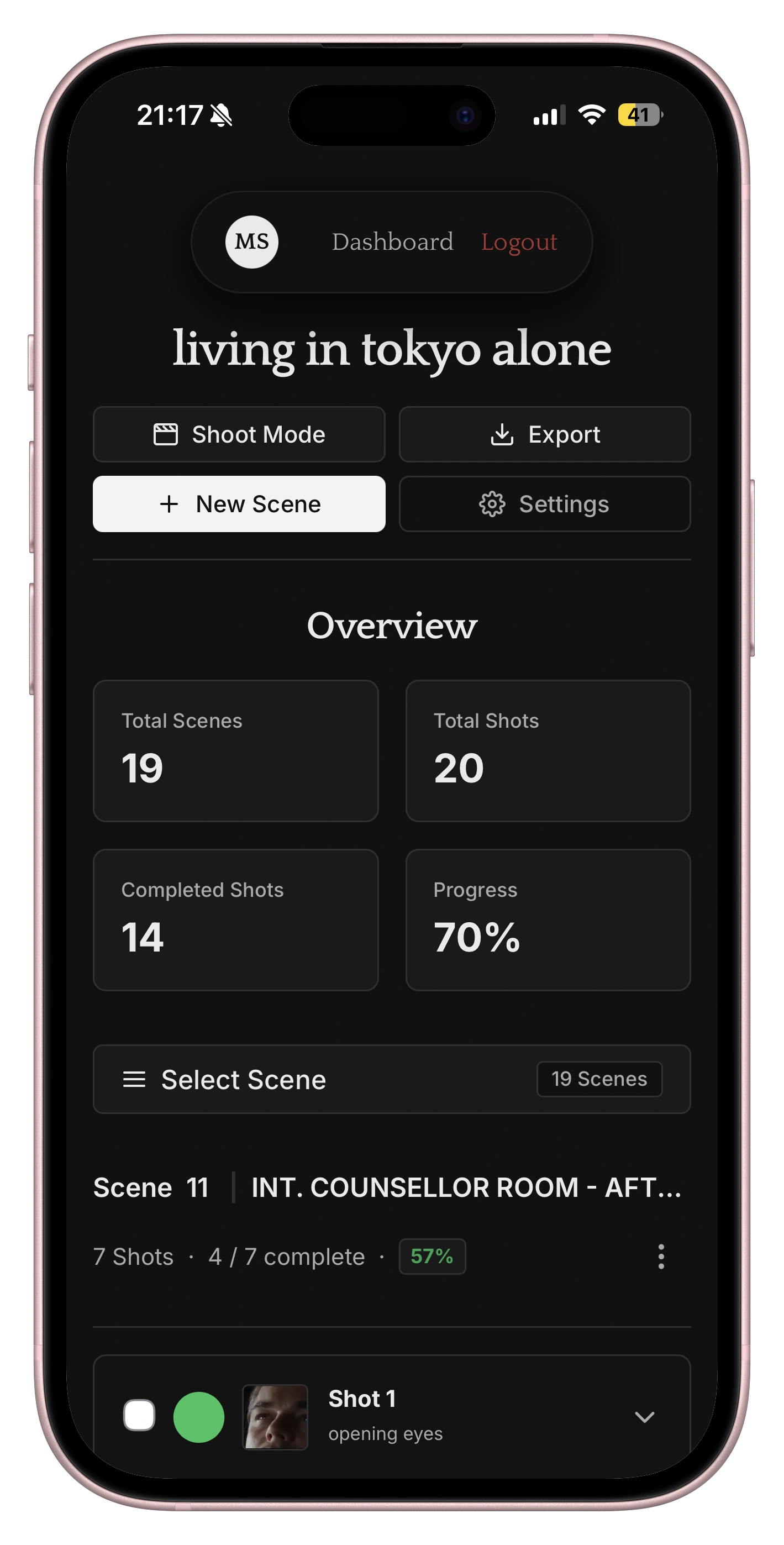
The interface is designed to work on smaller screens, so the shot list can be checked, updated, and used during production.
小さな画面でも使いやすいように設計しているため、撮影中でもショットリストを確認、更新、活用できます。
Outcome
成果
MomentShot turned a messy personal workflow into a structured production tool. Instead of planning shoots across scattered notes, screenshots, and documents, I can keep scenes, shots, references, schedules, and exports in one place. The project helped me plan shoots more clearly and reduced the friction between creative ideas and production execution.
MomentShotによって、散らばっていた個人の制作ワークフローを、構造化された制作ツールに変えることができました。メモ、スクリーンショット、ドキュメントを行き来しながら撮影を計画するのではなく、シーン、ショット、参考画像、スケジュール、出力を一か所で管理できます。このプロジェクトにより、撮影計画がより明確になり、クリエイティブなアイデアを実際の制作に移すまでの摩擦を減らすことができました。
Key Takeaways
学び
MomentShot taught me that good solutions start with understanding the real problem. As both the creator and user, I experienced the challenges firsthand, including scattered notes, unclear shot order, and missing references. That experience helped me focus on features that made shoots clearer and more efficient. It also reinforced the importance of designing from the user’s perspective. Rather than relying on assumptions, you need to understand how people actually work and build around their needs. Most importantly, it strengthened my interest in creating digital products that reduce friction and bring clarity. Whether for filmmakers, businesses, or client teams, the goal is the same: understand the problem and build a solution people can genuinely use.
MomentShotを通じて、良いソリューションは本当の課題を理解することから始まると学びました。自分自身が作り手でありユーザーでもあったため、散らばったメモ、曖昧なショット順、足りない参考画像といった課題を直接感じていました。その経験があったからこそ、撮影をよりわかりやすく、効率的にする機能に集中できました。また、ユーザーの視点から設計する重要性も再確認しました。思い込みで作るのではなく、人が実際にどのように働き、何に困っているのかを理解し、そのニーズに合わせて作る必要があります。何より、このプロジェクトを通じて、摩擦を減らし、明確さを生み出すデジタルプロダクトへの関心が強まりました。映像制作者、ビジネス、クライアントチームのいずれに対しても、目標は同じです。課題を定義し、本当に使えるソリューションを形にすることです。
Visuals
ビジュアル